
Understanding Google’s Core Web Vitals and Their Impact
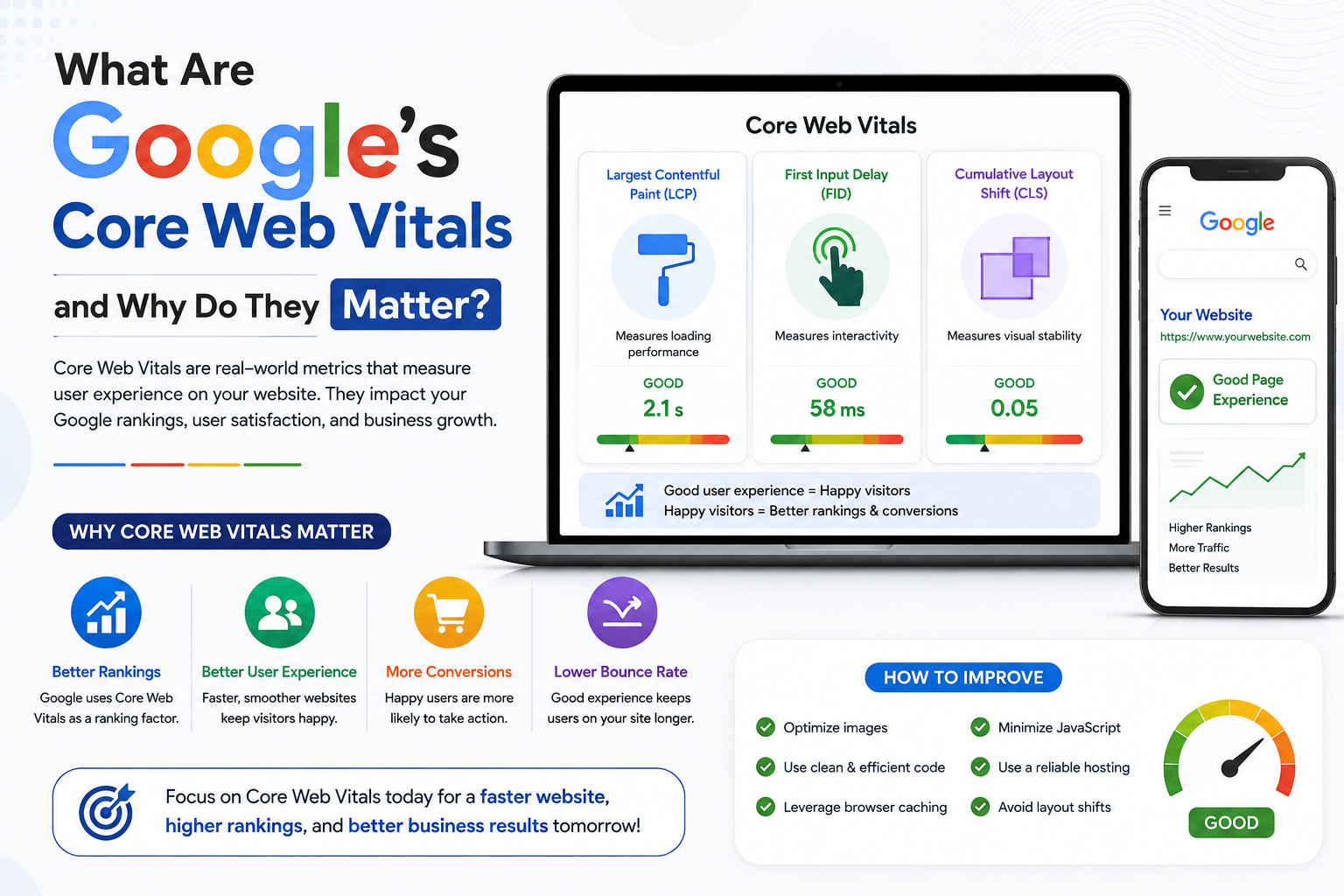
In the modern digital ecosystem, user experience (UX) has transitioned from a secondary consideration to the absolute bedrock of online success, as consumers navigate an infinite sea of digital choices with increasingly short attention spans and uncompromising expectations for speed, fluidity, and reliability. Recognizing that standard technical metrics often failed to capture the genuine, human-centric reality of browsing the web, Google introduced Core Web Vitals—a targeted set of quantitative performance indicators designed to measure real-world user experience across three critical dimensions of web interactions: loading speed, visual stability, and responsive interactivity. These vitals are not arbitrary benchmarks cooked up in an isolated engineering lab; rather, they are derived from extensive telemetry capturing how real users perceive digital friction on both desktop and mobile devices.
From a commercial and business intelligence standpoint, the correlation between Core Web Vitals optimization and revenue conversion is undeniable, heavily documented, and universally profound across industries ranging from e-commerce and SaaS platforms to digital publishing and local service lead generation. Countless industry case studies demonstrate that shaving even a few hundred milliseconds off page load times, eliminating layout jitter, and streamlining interaction delays leads directly to dramatic reductions in bounce rates, extended session durations, deeper content consumption, and elevated conversion rates. When a digital storefront operates with silky-smooth fluidity, consumer trust naturally flourishes; users feel secure navigating through complex product catalogs, reviewing detailed specifications, and completing frictionless checkout workflows without encountering frustrating interface roadblocks.In the modern digital ecosystem, user experience (UX) has transitioned from a secondary consideration to the absolute bedrock of online success, as consumers navigate an infinite sea of digital choices with increasingly short attention spans and uncompromising expectations for speed, fluidity, and reliability. Recognizing that standard technical metrics often failed to capture the genuine, human-centric reality of browsing the web, Google introduced Core Web Vitals—a targeted set of quantitative performance indicators designed to measure real-world user experience across three critical dimensions of web interactions: loading speed, visual stability, and responsive interactivity. These vitals are not arbitrary benchmarks cooked up in an isolated engineering lab; rather, they are derived from extensive telemetry capturing how real users perceive digital friction on both desktop and mobile devices.
Understanding Core Web Vitals: The Essentials
Core Web Vitals are a specific subset of Google’s broader “Web Vitals” framework. They apply to all web pages, should be measured by all site owners, and are featured prominently across Google’s developer and SEO toolsets.
In the digital landscape, user experience (UX) is no longer just a nice-to-have bonus; it is the core determinant of whether a website succeeds or fails. With millions of sites competing for attention, users have grown fiercely impatient. If a website takes too long to load, stutters when you try to click a button, or shifts its layout right as you go to tap a link, visitors will bounce in a fraction of a second.
To quantify and standardize what constitutes a “good” web experience, Google introduced Core Web Vitals. These metrics have fundamentally transformed how developers build sites, how marketers approach SEO, and how users experience the internet.
Google designed these metrics to capture three critical pillars of user-centric performance:
Loading performance
Interactivity / Responsiveness
Visual stability
1. Largest Contentful Paint (LCP) – Loading Performance
What it measures: LCP measures how long it takes for the main content of a web page to load and become visible to the user. Specifically, it tracks the rendering time of the largest image, video, or text block visible within the viewport (the part of the screen visible without scrolling).
The Benchmark:
Good: Under 2.5 seconds
Needs Improvement: 2.5 to 4.0 seconds
Poor: Over 4.0 seconds
Why it matters: Users judge a site’s speed within the first few seconds of clicking a link. If an LCP element (like a massive hero banner image or a block of text) takes too long to appear, the user feels like the site is sluggish and is prone to abandoning it.
2. Interaction to Next Paint (INP) – Interactivity and Responsiveness
What it measures: INP evaluates a page’s overall responsiveness to user interactions. It monitors all clicks, taps, and keyboard inputs made throughout the lifespan of a user’s visit, recording the time it takes for the browser to visually update and paint the next frame in response. (Note: INP officially replaced First Input Delay (FID) as a Core Web Vital to provide a more holistic assessment of site responsiveness).
The Benchmark:
Good: Under 200 milliseconds
Needs Improvement: 200 to 500 milliseconds
Poor: Over 500 milliseconds
Why it matters: Have you ever clicked a button or tapped a menu item and felt like the page froze? That is a high INP score in action. When a site responds instantly, it feels alive, fluid, and trustworthy.
3. Cumulative Layout Shift (CLS) – Visual Stability
What it measures: INP evaluates a page’s overall responsiveness to user interactions. It monitors all clicks, taps, and keyboard inputs made throughout the lifespan of a user’s visit, recording the time it takes for the browser to visually update and paint the next frame in response. (Note: INP officially replaced First Input Delay (FID) as a Core Web Vital to provide a more holistic assessment of site responsiveness).
The Benchmark:
Good: Under 200 milliseconds
Needs Improvement: 200 to 500 milliseconds
Poor: Over 500 milliseconds
Why it matters: Have you ever clicked a button or tapped a menu item and felt like the page froze? That is a high INP score in action. When a site responds instantly, it feels alive, fluid, and trustworthy.
Why Do Core Web Vitals Matter?
Core Web Vitals are important for two massive reasons: Search Engine Optimization (SEO) and User Conversion/Retention.
1. They Are a Direct Google Ranking Factor
Google’s primary goal is to provide users with the best possible answers and the best possible experiences. Because of this, Core Web Vitals are integrated directly into Google’s core ranking systems.
While great content will always remain king, two sites with identical content quality will see Google favor the one that delivers a faster, more stable, and more responsive page experience. Failing to meet these standards can cause your organic search visibility to plateau or drop as competitors optimize their technical foundations.
2. They Drive Higher Conversion Rates and Revenue
Technical performance directly influences business metrics. Case studies across e-commerce, publishing, and SaaS consistently show that shaving milliseconds off load times and fixing layout instability leads to:
Lower Bounce Rates: Users stay on pages longer when they load instantly and don’t jump around.
Increased Engagement: Fluid interactions encourage users to click deeper into a site, read more articles, or browse more product categories.
Higher Revenue/Conversions: A smooth checkout process or frictionless form submission pipeline translates directly into higher sales and lead generation.
How to Measure Your Core Web Vitals
Before you can fix performance issues, you need to measure them accurately. Google splits data collection into two categories: Lab Data (simulated testing in a controlled environment) and Field Data (real-world user telemetry).
Top tools to audit your site include:
Google Search Console: The Core Web Vitals report highlights groups of URLs on your live site that are failing or passing based on real-world user data from Chrome users.
PageSpeed Insights (Lighthouse): Provides both lab data and field data, offering specific diagnostic recommendations to fix LCP, INP, and CLS bottlenecks.
Chrome DevTools: Perfect for developers looking to debug performance problems line-by-line in real-time.
Best Practices for Optimizing Core Web Vitals
Optimizing your site requires a targeted approach for each metric:
To Improve LCP: Compress and modernise images (use WebP or AVIF formats), implement a Content Delivery Network (CDN), leverage browser caching, and eliminate render-blocking JavaScript and CSS in your header.
To Improve INP: Break down long-running JavaScript tasks into smaller chunks, minimize heavy third-party scripts, and optimize event listeners so the main thread remains free to handle user clicks immediately.
To Improve CLS: Always specify explicit size dimensions (
widthandheight) for images, videos, and ad slots so the browser reserves the correct amount of space before they load. Avoid injecting dynamic content above existing content.
Conclusion
Google’s Core Web Vitals are much more than a checklist for web developers or a superficial SEO hurdle. They represent a shift toward a faster, cleaner, and more respectful internet. By prioritizing loading speed, visual stability, and responsive interactions, you create an environment where users feel valued. In turn, you will reap the rewards of higher search rankings, lower bounce rates, and a healthier bottom line.