
Choosing the right keywords is the foundation of any successful SEO and digital marketing strategy. Without them, you are essentially shouting into an empty room, hoping potential customers will somehow find you. Selecting the right search terms bridges the gap between what your audience is searching for and what your website offers
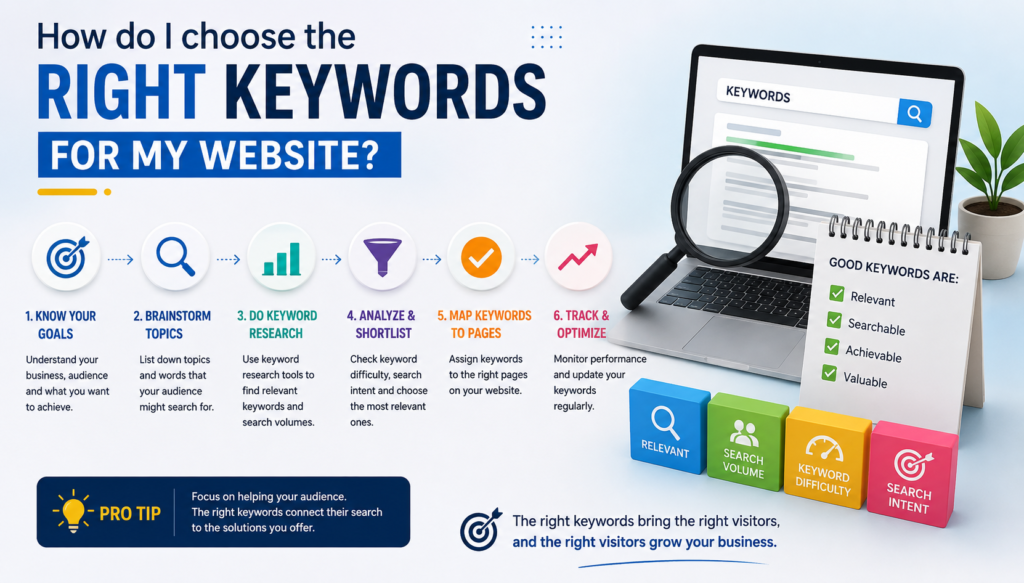
The right keywords for your website starts with understanding your audience and their search intent—knowing whether they want information, a specific brand, or a product to buy. Begin by brainstorming broad seed keywords related to your business, then use tools like Google Keyword Planner to uncover exact search volumes and competition levels. Instead of chasing high-traffic, ultra-competitive short terms, focus on specific long-tail phrases that attract targeted traffic with higher conversion rates. Finally, map your chosen keywords strategically to individual pages, ensuring every piece of content serves a distinct purpose and directly answers user queries.Choosing the right keywords is the foundation of any successful SEO and digital marketing strategy. Without them, you are essentially shouting into an empty room, hoping potential customers will somehow find you. Selecting the right search terms bridges the gap between what your audience is searching for and what your website offers.
This step-by-step guide outlines how to find and choose the right keywords to drive targeted traffic, generate leads, and grow your online presence.
1. Understand Your Audience and Search Intent
What terms would they type into Google when looking for your product or service?
More importantly, look at search intent—the “why” behind a query. Intent typically falls into four categories:
Informational: Users looking for answers (e.g., “how to choose keywords”).
Navigational: Users looking for a specific brand or website (e.g., “Younickmind digital marketing”).
Commercial: Users researching before a purchase (e.g., “best digital marketing classes in kalyan”).
Transactional: Users ready to buy or sign up (e.g., “enroll in digital marketing course online”).
Targeting the intent that matches your page’s goal ensures visitors find what they need, leading to higher engagement and conversions.
2. Brainstorm Seed Keywords
Start with broad terms related to your business, industry, or niche. These are your “seed keywords.” If you run a digital marketing training institute, your seed keywords might be:
Digital marketing
SEO training
Google Ads course
Learn marketing online
These seeds aren’t the final keywords you will target (they are usually too competitive), but they act as a jumping-off point for deeper research.
3. Leverage Keyword Research Tools
Expand your seed list into a robust keyword database using industry tools like Google Keyword Planner, Ahrefs, SEMrush, or Ubersuggest. Enter your seed terms to uncover:
Search Volume: How many people search for that term each month.
Keyword Difficulty (KD): How hard it will be to rank for that term against competitors.
Related Variations: Alternative phrasing, synonyms, and long-tail questions users are asking.
4. Focus on Long-Tail Keywords
Beginners often make the mistake of targeting high-volume, broad keywords (like “shoes” or “digital marketing”). These are dominated by massive global brands and are nearly impossible to rank for initially.
Instead, prioritize long-tail keywords—longer, more specific phrases (like “advanced Google Ads coaching in Kalyan”).
Why they work: They have lower search volume, but much higher conversion rates because the user knows exactly what they want.
Less Competition: It is significantly easier for a growing website to rank for a 4-word phrase than a 1-word term.
5. Analyze Your Competitors
Look at the websites already ranking on page one for your target terms.
What kind of content are they creating?
Are they missing anything you can cover in more detail?
Can you offer a faster loading page, better design, or fresher data?
Use competitor analysis tools to see which keywords are already bringing traffic to rival sites, and identify gaps you can capitalize on.
6. Prioritize and Map Your Keywords
Once you have a curated list, map your keywords to specific pages on your website:
Homepage: Broad, high-level brand and core service keywords.
Service/Product Pages: Commercial and transactional keywords specific to that offering.
Blog Posts: Informational and long-tail question-based keywords.
Avoid keyword cannibalization—a mistake where multiple pages on your site target the exact same keyword, causing them to compete against each other in search results.
Key Takeaway: Keyword research is not a one-time task; it is an ongoing process. Search trends shift, user behavior evolves, and your content should adapt accordingly. Audit your keyword performance every few months to refine your strategy and capture new growth opportunities.